Afrikaans
Arabic
Bahasa
Bengali
Cantonese
Catalan
Chinese
Czech
Dutch
English
Farsi
Filipino
French
German
Greek
Hausa
Hebrew
Hindi
Hungarian
Indonesian
Italian
Irish
Japanese
Korean
Latin
Luxembourgish
Mandarin
Norwegian
Persian
Polish
Portuguese
Russian
Spanish
Swahili
Swedish
Tagalog
Thai
Turkish
Ukrainian
Vietnamese
It's difficult to "summarize" the booming expansion that has occurred with the Kaufmann crew since "The Linguist" appeared on Free Language over a year ago. That is why Free Language has numerous articles on the various websites and resources available through multilinguist Steve Kaufmann's web entelechy, including the many LinqQ [liŋk] podcasts, the LingQ method, revisiting The Linguist on Language and why not throw in a little thelinguist.com love, too. :)
This particular podcast is JapaneseLingQ, a roughly weekly podcast with mp3 audio content for Japanese language learners. Transcripts of the podcasts are available through LingQ.
What is JapaneseLingQ?
First of all, the name itself (which is pronounced Japanese Link) needs a little explaining. The first part, “Japanese”, is fairly obvious since we teach Japanese. LingQ is the name of our online learning system which you can find at LingQ.com. At LingQ you’ll study many different languages in a fun, community atmosphere. The “Ling” in LingQ comes from TheLinguist.com the people behind LingQ. Lastly, the “Q” is important because it forms the speech bubble in our logo and throughout our site and because it makes “lingq” sound like “link” (we think!) which is what our system does for you.
At JapaneseLingQ...
. we LingQ you to a world of real Japanese content
. we LingQ you to our revolutionary learning tools
. we LingQ you to a community of fellow Japanese learnersOur podcasts may contain interviews, articles, or audiobook excerpts but are most often just general conversations in Japanese. We will usually talk about topics of general interest. Please do send us feedback and topic requests. We’re always happy to hear from you.
After you listen to the podcast, sign up for a free account at LingQ (l-i-n-g-q.com) and study the full transcript using LingQ's revolutionary learning tools.
At LingQ, you may also want to submit writing for correction or join live 1 on 1 and group discussions with our tutors. Plus you will find thousands more podcasts with transcript. Come and find out what LingQ is all about!
Of course, even if you don’t decide to become a member, you can continue listening to the podcasts as long as you like.
Subscribe to JapaneseLingQ Podcast.
Subscribe to JapaneseLingQ Podcast via iTunes.
EnglishLingQ
FrenchLingQ
GermanLingQ
JapaneseLingQ
PortugueseLingQ
RussianLingQ
SpanishLingQ
SwedishLingQ
This is a cute and funny podcast where a father and son have a dialog in which they translate funny phrases into English and Japanese.
I have added this in the Learn English as well as the Learn Japanese sections since it can be entertaining to students of both languages.
I’m an American who has been living in Japan since 1990. My other podcast, Herro Flom Japan, is listened to by hundreds of very nice people around the world. I work in Tokyo but live in Koga, Ibaraki Prefecture.
Tony is my 10 year old son. He likes video games, playing with his friends and his little brother Andy, dodge ball, card-based games and saying anything with the word “poop” in it.
Tony and I like to play a game where one of us says something totally insane and ridiculous in our own native language, and the other has to translate it. This is us, having fun with silly phrases. Caution: Podcasts may contain any of the following words in Japanese and/or English: booger, fart, dingleberry, poop, buttface or wee-wee. (Well, probably not wee-wee.)
Subscribe to the Japlish Podcast.
Subscribe to the Japlish Podcast via iTunes.
Want to learn how to use Sura-Sura Kanji Quizzer? It's easy!
Step 1: Select Kanji
Sura-Sura Kanji Quizzer has hundreds of kanji to display, but usually you'll only want to see a few at a time. Use the Select Kanji section to activate the kanji you'd like to quiz from. If you haven't yet created an account and logged in, you will be given an opportunity to do so.
Several different selection methods are available to help you find the ones you want. You can select by chapter, by difficulty, or by active status. (An active kanji is one that the quizzer might display.) Selecting by active status is useful if you want to activate or deactivate all kanji.
Javascript should be enabled on your web browser for the selection page to work properly. The first time you visit the page, it may take awhile to download all the images, but it will be faster on subsequent visits.
Step 2: Use the Quizzer
The Quizzer section displays kanji from your active list in a random order. Only the information you want to see is displayed. You can move your mouse over the hidden information to reveal it.
If you think you've mastered the displayed kanji, click the "Success" button to deactivate it. (You can always reactivate it later.) If you weren't able to easily remember the hidden information, keep the kanji active by clicking the "Keep Trying" button.
Step 3: Repeat!
Once you've deactivated all your active kanji using the quizzer, pat yourself on the back for a job well done. You'll probably want to try again later to make sure that you really know them all.
An excellent site for all of your online Kanji practicing needs, this resource is clean, well-designed and incredibly useful.
This site's purpose:
This site was made to help anyone who is studying Japanese, specifically studying for the Japanese Language Proficiency Test (JLPT). if you don't know anything about the test, a good place to start is the Japan foundation of LA (though it is mainly overview and where to apply information). We have more information about the test on this site at about the JLPT.
What this site can do:
The main point of this site is to act as a day-by-day calendar with a new kanji from the level of the test you are studying for. So, registering makes this site much more useful (it is free, painless, and we'll never send it to anyone). When you register the site remembers what level you are studying for, and automatically loads the kanji that will appear on the test you are studying for. Also, any vocab on the vocab list for that level will be displayed below the kanji. If you click on one of the kanji in the vocab list (anywhere on the site) a pop up with the kanji and all of its compounds in the dictionary will appear.
Additionally, you can download the kanji or vocab lists for any level in a html formatted file (you can view them with word or some other word processor program). These will be customizable to the extent of you can choose what you want on your list (ie: kanji, kana, definition or kanji, romaji, part of speech, definition). There is also a Japanese -> English and English->Japanese dictionary and a Kanji dictionary on the right toolbar. Anytime you look up a word or view "Today's Kanji" you can choose to add the vocab/kanji to your personal list. This is usefull when word comes up that you want to remember, you can have quick access to it with your vocab/kanji list.
An excellent site for learning Japanese kanji, as well as hiragana and katakana.
This is an excellent resource for Japanese learners of all levels.
"World Nomads present a series of podcast language guides. They are yours to download for free and contain all the essential phrases to keep you travelling safely.
We hope that in 2007 there'll be time to produce a few more guides, so feel free to leave us a comment or send an email with suggestions for the languages you'd like to learn."
This podcast, along with other podcasts by World Nomads, has nice entries with world-traveler action and a transcription to boot.
Rosetta Stone doesn't want you to know this! The best deals on Rosetta Stone software can be found here on eBay.
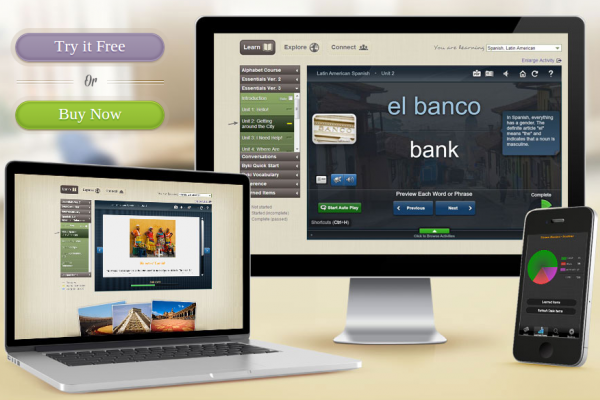
Rosetta Stone is proprietary language-learning software produced by Rosetta Stone, Ltd. Its title and its logo are an allusion to the Rosetta Stone, an artifact inscribed in multiple languages that helped researchers to decipher Ancient Egyptian by comparing it to the Greek inscription.
The Rosetta Stone software utilizes a combination of images, text, and sound, with difficulty levels increasing as the student progresses, in order to teach various vocabulary terms and grammatical functions intuitively, without drills or translation. Their method is called the Dynamic Immersion method. The goal is to teach languages the way first languages are learned.
Several different packages of lessons are available. The full course in each language is separated into three levels. There is only one level available for Latin. All retail software packages except the homeschool version contain two CDs, one with the application software and another with the instruction. The homeschool version also consists of disks for a server program and a student management program.
Get the best prices here on all Rosetta Stone products!
Arabic (Modern Standard), Chinese (Mandarin), Danish, Dutch, English (American), English (British), French (Parisian), German, Indonesian, Swahili, Tagalog (Filipino), Greek, Hebrew, Hindi, Indonesian, Irish, Italian, Japanese, Korean, Latin, Persian (Farsi), Pashto, Polish, Portuguese (Brazil), Russian, Spanish (Latin America), Spanish (Spain), Swedish, Swahili, Tagalog (Filipino), Thai, Turkish, Vietnamese and Welsh
All languages except Latin use the same set of words and sentences in the same order, with the same images (some of which are recycled from lesson to lesson). There are three levels of instruction, each sold separately, or they can be purchased bundled for a discount. In version two, most languages were offered with only two levels, though a few were offered in a third:
Level 1 consists of eight units, starting from simple vocabulary such as "boy", "girl", "man", "woman", moving up through numbers, the past and future tenses and concluding with a unit on giving directions. Units 1 through 4 have 10 lessons plus a review lesson, units 5 through 8 have 11 lessons plus a review lesson. 92 total lessons in level 1.
Level 2 offers units 9 through 19; however as a practical matter there are only nine units devoted to instruction since units 18 and 19 are "glossary" units devoted to single words having to do with a particular topic (school, nature, automobiles etc.). Level 2 units consider more advanced grammatical concepts, as well as specific subjects like banking, shopping and travel. These exercises also use short video clips in QuickTime format to illustrate some verbs. Units 16 and 17 consist solely of old Saturday Evening Post cartoons and their captions. 118 total lessons in level 2.
Level 3 is no longer offered on version 2 products, but when it was, it used longer video and writing passages to expand the level of instruction.
In version 3, all languages have three levels, though what they cover is different; there is more of a focus on conversation and less on complex grammatical topics.
Level 1 consists of four units, each with four thirty-minute lessons and a number of five to fifteen minute activities. The level, which is supposed to "build a foundation of fundamental vocabulary and essential language structure," takes about 24 hours to complete following Rosetta Stone's recommended course. Starting from simple vocabulary such as basic greetings, "boy", "girl", "man", and "woman", moving up through numbers, comparisons, adjectives, nouns, future tense, and telling time. Each unit also contains a ten-minute simulated conversation called a "Milestone."
The four units in Level 1 are: The Basics, Friends and Family, Work and School, and Shopping.
Level 2 offers units 5 through 8, for a total of about twenty-four hours designed to teach you to "navigate your surroundings as you build on the vocabulary and essential language structure in Level 1." More grammar is covered, including past and future tenses, and imperative forms. Topics such as giving directions, writing letters, workplace terms, apologies, discussing emotions, and criticizing art are also covered. As in Level 1, each unit is followed by a ten-minute "Milestone."
The four units in Level 2 are: Travel, Past and Future, Friends and Social Life, and Dining and Vacation.
Level 3 offers the final four units (9 through 12), which are supposed to help "connect with the world around you by building on the language fundamentals and conversational skills you developed in Levels 1 and 2." In addition to expanding upon grammar learned in Levels 1 and 2, Level 3 teaches more in depth vocabulary, including botanical terms, culinary terms, how to express detailed opinions and judgments, and how to discuss politics, religion, and business. As in the first two levels, each unit contains a ten-minute "Milestone" activity in which the user participates in a simulated conversation.
The four units in Level 3 are: Home and Health, Life and World, Places and Events, and Talking About the World.
An Explorer package consisting basically of the first three units from Level I was available for a much cheaper price than the full Level I. This product is no longer available from the publisher.
A Traveler version, consisting of several lessons focusing on basic terms as well as vocabulary important for travel, was produced in the late 1990s and is no longer available.
Audio Companion was released on June 9, 2008 and is meant to reinforce what is learned using the computer software. It is portable and is meant to be played on a CD player or MP3 player.
The best deals on Rosetta Stone software can be found here.
"Welcome to the Underground Global Japanese Tutorial. Here, you will be able to find numerous ways to learn or continue to study Japanese efficiently. If you are a newcomer to the Japanese language, it may appear difficult on the surface, but you will likely come to see that Japanese is not only not that complicated when broken down, but also that it is a fun language to learn. If you have already begun to learn Japanese, then this site may also come in handy for future reference. Hopefully, this page will be able to aid you in your efforts, regardless to whether you are a beginner, an intermediate speaker, or an advanced speaker. I myself have been a self-taught student of Japanese since 1999; therefore, it is possible that this tutorial may be imperfect. Although I am not an expert on the Japanese language or a native speaker, I do feel that this tutorial will prove very helpful for other learners of Japanese much like me."
This website has some very helpful basic information about the Japanese language. Of special note are the resources for learning Japanese Kanji, Hiragana and Katakana, as well as information about Japanese verb conjugations and sentence structure (syntax).
Also helpful are the audio samples of a conversation, which allow beginners to get a feeling for what the language sounds like.
"Learn Japanese with our free Japanese lessons in podcast format. We use examples from anime and everyday conversation to teach you Japanese that is useful for everyday life. Hitomi-sensei is from Tokyo and will teach you to speak with the most common Japanese accent. If you are watching an anime now and want to know more about a word or phrase you have heard, post a comment or send us an email."
Cool site with a good podcast that's been around since 2005 and offers a wide range of podcast topics and learning levels.
Also lots of other good resources on the website, including info about "Weird Japan", JPop, Anime and Japanese study guides and books.
Lots of content on this podcast. They have episodes that touch on such topics as holidays, seasons, a trip to the doctor, classroom talk, weather info, family, sake, beer and hanging out with a flamboyant hairdresser! Practical stuff, of course.
You can even learn how to yell at your children! And a lot more, obviously.
Also, keep in mind that this podcast feed is also interspersed with blog entries, so not every entry is a podcast.
Visit Learn Japanese Podcast on LibSyn.
If you can read the Japanese above, you probably don't need to listen to this podcast! No, really though, there was no English text to use, so that has to do it.
This podcast is technically for Japanese speakers learning English, but advanced speakers of Japanese could gleam some information from this podcast.
This podcast has been around since mid-September 2006. PDF scripts are supplied, which make a huge difference in understanding what is going on in the podcasts.
'Machigai' means 'mistake'. This started with a column in an English study newspaper, Mainichi Weekly, about common mistakes that Japanese make in English. The column has continued for nearly four years so far.
私は、1989年に日本で英会話の講師になりました。しばらくして、私は「皆が同じ間違いをしている!」と気付きました。じつに多くの生徒たちが、 "the another one" や “Let's go with me.” などと言っていました。そして、じつに多くの店が "CLOSE" と書かれた看板をドアに掲げていました。やがて私は、このようなよくある間違いをリストアップして解説したら、多くの日本人が英語力をのばすのに役立つかもしれないと考えたのです。そこで、それまでに何度も何度も何度も耳にした、これらの間違いのリストアップをスタートさせました。その後、2003年の4 月にスタートしたMainichi Weekly の MACHIGAI! という連載コラムの中で、このリストを紹介する機会に恵まれました。
Subscribe to Machigai Podcast.
View Machigai Podcast's Feed on Free Language