Learn Languages Online and Mobile

Learn Languages Online

Get a free lesson right now from Babbel and enjoy real success learning Spanish, English, French, German, Italian, Portuguese, Swedish, Polish, Turkish, Indonesian and Dutch.

You Make Language Happen

Free Language Newsletter

Discover the magic of learning languages.

Subscribe to the Free Language Letter.

Your Name:

Your Email:

Ask Questions, Get Answers

Ask Language Questions

Ask anything about learning and teaching languages! Share your language questions.

View questions that have been asked and answered. Together we are creating a collective knowledge base for effective language learning and teaching. You can help!

advanced

TED Talks

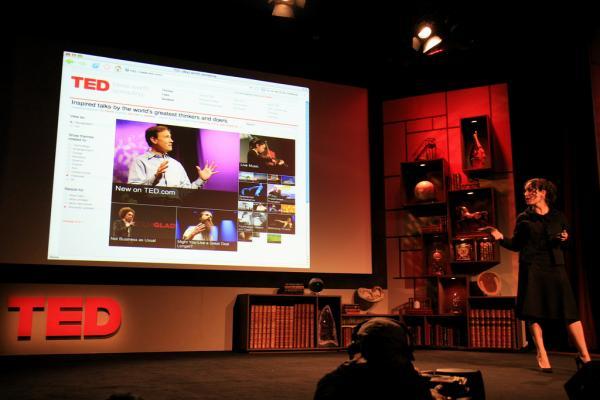
A Hidden Gem for Language Lovers and Learners

This article presents a unique approach for intermediate to advanced (and beyond) learners of many languages to gain exposure to interesting material in their target language(s). It has to do with a very popular website that features short (usually less than ten minutes) presentations by some of the world's greatest and most famous minds (not always both ;) on their specific areas of expertise. It's called, simply, TED, and the presentations are called "TED Talks".

The TED website itself is not geared towards language learners or educators yet is useful for both. It is especially useful for English learners, as all the talks are in English. But it's also useful for anyone learning most of the world's most-spoken languages (as well as numerous lesser-spoken ones) who want to simultaneously watch inspiring, funny, courageous, fascinating, informative, persuasive, ingenious and often jaw-dropping presentations about technology, science, entertainment, design, business and global issues - all while gaining exposure to their target language. Here's how and why...

Your rating: None Average: 4.2 (13 votes)

Free Portuguese Course with Flashcards and Sentence Manager

Summary

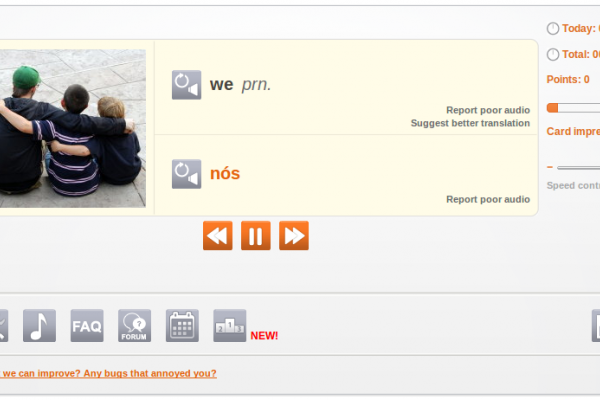
Portuguese-Flashcards.com is a fast-loading, useful site for Portuguese learners to manage and practice vocabulary lists (words and sentences). There are many existing word and sentence lists created by other users that you can snag and use right away. You can also create your own lists and sentences on-the-fly and test yourself until you know them all. As a result, this resource works for Portuguese students of all levels, beginner to advanced, learning European and Brazilian varieties. The self-testing is done via built-in flashcard software that you control.

The website has an integrated dictionary that gives explanations of terms and includes examples of how these are used in real sentences. In addition, when you view a sentence, you can scroll over the words and view annotations. NB: You can copy and paste any Portuguese text you want into the site's Text Analyzer and it provides you with what you see below (see grey scroll-over pop-up in image for glosses).

Portuguese Course Sentences

Something I have found incredibly useful is the Sentence of the Day email that you can subscribe to on the site. This sends a different sentence every day and is complete with a translation of the sentence, plus a link to hear a native speaker say the sentence.

If you upgrade to a premuim membership (~$5/month) you can also hear audio for the sentence. In fact, the only thing you cannot do without a membership is hear the audio on the site. Other than that, it is full-featured and incredibly quick and helpful for learning Portuguese through memorizing words/sentences and their constituents.

Bravo Oliver for this excellent site and keep up the great work!

From Website

Study Portuguese from Home

Introduction

Since our first flashcard website started in 2005 a lot of time has been invested to design an efficient system which enables you to learn a new language in the shortest time possible. Make sure to read this introduction carefully so you understand how the system works. Once you know how this website works and you use it regularly it will become an important tool to learn Portuguese. Ideally make time each day for 2 or 3 sessions a day, each lasting about 10 - 15 minutes.

Once you have created your own account you can set up your own word list. You can either add words manually or automatically to your own word list.

Automatic Mode

If you choose this mode then the system will choose random words for you to practice. Within the "Automatic Mode" there are two different choices. The first is "completely random words" and the second is "frequent words first". Obviously if you are a beginner you should focus on those frequent words first, if you chose the level "Complete Newbie", "Basic" or "Intermediate" the system will just do that. If you chose the level "Upper Intermediate" or "Advanced" completely random words will be added to your word list.

Manual Mode

If you would like more control over which words you learn switch to the "Manual Mode". In this mode you choose which words you want to learn and not the system. There are a few ways to add words manually. The first is to use the search function in the navigation bar on the left-hand side. You can search for Portuguese or English words. On the result page every found word has an "Add Word" link next to it. Click it to add this word to your personal list. After you click it the link text will change to "Remove Word", so you can immediately remove the word from your list if you have added it by mistake.

The second way to add words manually is to click the link "Add new Words" in the navigation. This will show random words for you to add.

Finally you can add words by clicking on "Public Word Lists". These public lists normally have a common theme, like "Animals", "Computer", "Fruits", etc. You can either pick some words of these public lists or copy the whole list.

By default you are in the "Automatic Mode". If you do not want to add words automatically you can change this in the settings. In the "Automatic Mode" you can also add words manually.

The Loop

Portuguese Course Free Sentence of the Day Email

The main problem of learning new words is that over time word lists grow very big. This means that the learner feels overwhelmed and the time between word repetitions becomes too long. To solve this problem a so-called "Loop" is used.

The Loop consists of a subset of only 30 words out of your word list. This means you can concentrate on a few words only, until you have memorized them properly. To keep a flashcard in the loop click on the "Loop" button.

If you have become familiar with a new word which is in the Loop click on "1 day", "7 days", "30 days" etc. Which means that the word will be shown only after the indicated time has passed. If you know a word very well click on "30 Days" or "3 Months" so the word will be shown only after a long time. After the indicated time has passed the word will be put into the Queue.

Once you remove a word from the Loop another one will be put in the Loop. The system will first check if there are any words in the "Queue". If the Queue is empty and you are in "Automatic Mode" the system will choose a new word for you and add it to your word list and into the Loop. If you are in the "Manual Mode" the system will tell you that you need to add more words in order to continue. It is important not to let the queue grow too big, otherwise the system will become increasingly inefficient. Your every day task is to clear the queue and add 5 to 10 new words to your list.

If you click "Remove" then the word will be removed from your word list. "Block" will do the same except that it will also prevent the word from coming back in the "Automatic Mode" where the system chooses words for you. By default there are 30 words in the loop. You can change the number of words in the loop in the settings.

Word Lists

If the Loop system sounds too complicated to you, then you can also set up simple word lists. To do this click on "[Manage Lists]" in the navigation. Then click on "[Add List]" to create a new list. If you want to share this word list with other users select the box "Public List". If you want to immediately add new words to this list select "Also Activate". You can create as many lists as you want. In the navigation bar you can always see which list is active at the moment. Words will be added to the currently active list.

Visit Portuguese-Flashcards.com

Your rating: None Average: 3.6 (14 votes)

Wikipedia Learn Portuguese Language

Summary

If you don't know about Wikipedia, now is the time to find out! Especially since it is so useful in learning languages.

Wikipedia is the "Free Encyclopedia", a collectively-authored, dynamic, online encyclopedia that is free not only as in price, but also as in freedom. This means that the content you find anywhere on Wikipedia is free and open in the Public Domain. You can reproduce, redistribute and rehash the information there. This is empowered by the GNU Free Documentation License. This same license protects and empowers the contant on Free Language! (How?)

This particular resource links to the Wikipedia entry on the Portuguese language. This entry contains loads of information for the curious reader as well as for the serious Portuguese language learner, including historical and linguistic data.

Use this resource to become familiar with the Portuguese language and its context in today's world, to discover facts and linguistic data about Portuguese and its many varieties, access further information about and resources for learning Portuguese, and much more.

From Resource

Portuguese (português or língua portuguesa) is a Romance language that originated in what is now Galicia (Spain) and northern Portugal from the Latin spoken by romanized Celtiberians about 1000 years ago. It spread worldwide in the 15th and 16th centuries as Portugal established a colonial and commercial empire (1415–1999) which spanned from Brazil in the Americas to Goa in India and Macau in China. During that time, many creole languages based on Portuguese also appeared around the world, especially in Africa, Asia and the Caribbean.

Today it is one of the world's major languages, ranked sixth according to number of native speakers (over 200 million). It is the language with the largest number of speakers in South America (188 million, over 51% of the continent's population), and also a major lingua franca in Africa. It is the official language of nine countries (see the table on the right), being co-official with Spanish and French in Equatorial Guinea, with Chinese in the Chinese special administrative region of Macau, and with Tetum in East Timor.

In July 2007, President Teodoro Obiang Ngumema announced his government's decision to make Portuguese Equatorial Guinea's third official language, in order to meet the requirements to apply for full membership of the Community of Portuguese Language Countries. This upgrading from its current Associate Observer condition would result in Equatorial Guinea being able to access several professional and academic exchange programs and the facilitation of cross-border circulation of citizens. Its application is currently being assessed by other CPLP members.

Spanish author Miguel de Cervantes once called Portuguese "the sweet language", whereas Brazilian writer Olavo Bilac poetically described it as a última flor do Lácio, inculta e bela: "the last flower of Latium, wild and beautiful".

Portuguese is the official language of Angola, Brazil, Cape Verde, Guinea-Bissau, Portugal, São Tomé and Príncipe and Mozambique. It is also one of the official languages of Equatorial Guinea (with Spanish and French), East Timor (with Tetum) and of the Chinese S.A.R. of Macau (with Chinese). It is widely spoken, but not official, in Andorra, Luxembourg, Namibia and Paraguay (in the latter country there were 112,520 native Portuguese speakers according to the 2002 census), and in the U.S. states of California, Connecticut, Florida, Massachusetts, New Jersey, New York, and Rhode Island. There is also a statistically significant Portuguese-speaking community (approximately 10,000 people) in Jersey. Portuguese Creoles are, while not officially recognized, the standard language for communication in Cape Verde and part of Guinea-Bissau's population. In Cape Verde most also speak standard Portuguese and have native level proficiency. There are also significant populations of Portuguese speakers in Canada (mainly concentrated in and around Toronto) and Bermuda. There are also small populations of speakers in the former Portuguese colonies of Goa and Daman and Diu which are now part of India.

Link

Visit "Portuguese Language" on Wikipedia.

License

GNU Free Documentation License

Your rating: None Average: 4 (2 votes)

Tá Falado Brazilian Portuguese Podcast Logo

Summary

This is an excellent, high-quality podcast from the University of Texas for learners of Brazilian Portuguese - especially those that speak or have studied Spanish.

The lessons are well-designed by professors and the material is quite helpful.

Bravo UT!

From Website

Our podcasts are designed to help those who are learning Portuguese, especially if you have a previous background in Spanish. First, you find some pronunciation podcasts that are built around dialogs illustrating specific sound differences. You can also download pdf transcripts and participate in a discussion blog for clarification of questions.

Next, you find grammar podcasts that focus on grammatical differences between Spanish and Portuguese. All of the lessons are also built around some cultural aspect that makes Brazil so awesome.

Try it out, and join our Brazilpod community. There are no registration fees or restrictions, just great chances to learn more Portuguese.

Visit Tá Falado Podcast.

Subscribe

Subscribe to Tá Falado Podcast.
Subscribe to Tá Falado Podcast via iTunes.

Screenshot

Tá Falado Podcast Screenshot

BBC Brasil Logo

Summary

Hey, what can be said? It's the BBC News Brasil in Portuguese!

If you are an intermediate to advanced learner of Portuguese you can really benefit from reading the news.

In addition, they always have videos of the latest news, which is a nice way to practice listening comprehension.

From Website

The BBC exists to enrich people’s lives with great programmes and services that inform, educate and entertain. Its vision is to be the most creative, trusted organisation in the world.

It provides a wide range of distinctive programmes and services for everyone, free of commercial interests and political bias. They include television, radio, national, local, childrens’, educational, language and other services for key interest groups.

Visit BBC News Brasil in Portuguese.

Subscribe

Subscribe to this news feed.