learn portuguese

Video: How to Use the BBC Website to Learn English, Chinese, French, German, Greek, Italian, Portuguese, Spanish, More - Free!

Summary

The BBC is such an amazing resource for learning languages online for free that we've done a 6-minute video showing how you can effectively use this resource to learn at least the basics of 36+ languages.

BBC offers materials for the following languages: Albanian, Basque, Belarusian, Bosnian, Bulgarian, Catalan, Chinese (Mandarin), Croatian, Czech, Danish, Dutch, English, Estonian, Finnish, Flemish, French, German, Greek, Hungarian, Icelandic, Italian, Latvian, Lithuanian, Luxembourgish, Macedonian (FYROM), Maltese, Norwegian, Polish, Portuguese, Romanian, Russian, Serbian, Slovak, Slovene, Spanish, Swedish, Turkish, Ukrainian

Enjoy and please leave comments to help us focus our efforts!

Screencast Video

Helpful Links for this Screencast

http://freelanguage.org/learn/bbc
http://www.bbc.co.uk/languages
http://www.bbc.co.uk/languages/chinese
http://www.bbc.co.uk/languages/english
http://www.bbc.co.uk/languages/french
http://www.bbc.co.uk/languages/german
http://www.bbc.co.uk/languages/greek
http://www.bbc.co.uk/languages/italian
http://www.bbc.co.uk/languages/portuguese
http://www.bbc.co.uk/languages/spanish
http://www.bbc.co.uk/languages/other
http://www.bbc.co.uk/languages/other/quickfix


How to Learn Languages Online for Free, Video Screencast Part 1: General Introduction

Summary

This is our first humble effort to disseminate much of the good info found on this website via screencast videos that make it easy to get a picture of learning languages online for free while kicking back, watching and soaking it up rather than reading through loads of material.

With this video we offer a 10-minute intro to useful sites for learning languages online for free. The web tour covers essential resources for vocabulary, grammar, dictionaries, translation, verb conjugation, language exchange and more.

We have started a channel on YouTube for these screencasts: http://www.youtube.com/user/freelanguageorg - you can help us a lot by rating and commenting on these videos on YouTube

Please let us know what you would like to see in future videos, too. We have a series planned and will be releasing them here frequently - your input will be valued and appreciated!

Screencast Video

Links in this Screencast

http://quizlet.com
http://www.transparent.com/wotd
http://lingro.com
http://www.gutenberg.org
http://wikibooks.org
http://www.busuu.com
http://www.babbel.com
http://www.myhappyplanet.com
http://palabea.net
http://www.reverso.com
http://www.wordreference.com
http://www.google.com/translate
http://www.verbix.com
http://freelanguage.org/the-big-list


Languages of Europe and Open-Content Textbooks Collection to Learn and Teach European Languages at Wikibooks.org

Wikibooks Logo

Summary

Wikibooks.org is a community for creating a free library of educational textbooks that anyone can edit. The Wikibook's Languages of Europe category can serve, for the language learner, educator and enthusiast, as an enormous doorway into the many European languages, both living and historical.

The European subcontinent has birthed and/or attracted an enormous variety of languages from many sub-branches of what linguists call the Indo-European languages.

Below you'll find direct links to a wide variety of European language open-content textbooks. These are free and open source, for everyone to use and benefit from. And collaborate on - especially language educators who have the knowledge to share with all through this open medium.

To boot, Wikibooks.org itself is available in a wide range of world languages!

From Wikibooks.org

Wikibooks Category: Languages of Europe

From Wikibooks, the open-content textbooks collection

These language books concern Languages of Europe. See also Subject:Languages of Europe.

European Languages with Books or Pages

Albanian, Aragonese, Armenian, Austrian, Basque, Belarusian, Breton, Bulgarian, Catalan, Chechen, Croatian, Danish, Galician, Gothic, Greenlandic, High Icelandic, Hungarian, Høgnorsk, Icelandic, Insubric, Irish, Italian, Latvian, Leonese, Lowland Scots, Macedonian, Manx, Neapolitan, Norwegian, Old Church Slavonic, Polish, Provençal, Romanian, Russian, Serbian, Sicilian, Silesian, Slovene, Swedish, Turkish, Ukrainian, Welsh

This may be incomplete when you read this. Please check the Languages of Europe page for the latest content.

Screenshot of Wikibooks.org European Languages

European Language Wikibooks Subcategories

Dutch language
English language
Finnish language
French language
German language
Greek language
Latin language
Lithuanian language
Portuguese language
Scottish Gaelic language
Spanish language
Yiddish language

Visit Wikibooks.org on Languages of Europe.
Wikipedia.org also has a category on Languages of Europe.

Your rating: None Average: 4.3 (8 votes)


Portuguese-Flashcards.com Free Portuguese Course with Loop Flashcard System, Sentence Manager, Dictionary, RSS Feeds

Free Portuguese Course with Flashcards and Sentence Manager

Summary

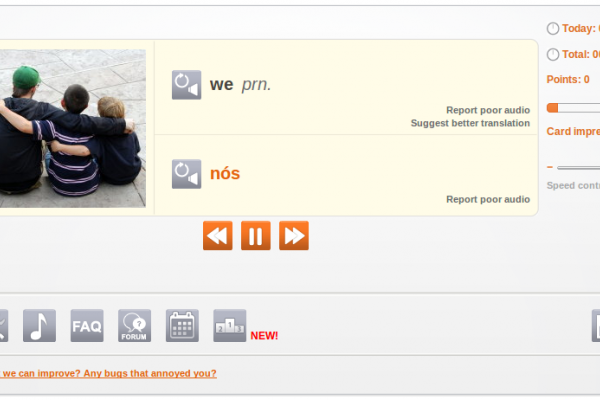
Portuguese-Flashcards.com is a fast-loading, useful site for Portuguese learners to manage and practice vocabulary lists (words and sentences). There are many existing word and sentence lists created by other users that you can snag and use right away. You can also create your own lists and sentences on-the-fly and test yourself until you know them all. As a result, this resource works for Portuguese students of all levels, beginner to advanced, learning European and Brazilian varieties. The self-testing is done via built-in flashcard software that you control.

The website has an integrated dictionary that gives explanations of terms and includes examples of how these are used in real sentences. In addition, when you view a sentence, you can scroll over the words and view annotations. NB: You can copy and paste any Portuguese text you want into the site's Text Analyzer and it provides you with what you see below (see grey scroll-over pop-up in image for glosses).

Portuguese Course Sentences

Something I have found incredibly useful is the Sentence of the Day email that you can subscribe to on the site. This sends a different sentence every day and is complete with a translation of the sentence, plus a link to hear a native speaker say the sentence.

If you upgrade to a premuim membership (~$5/month) you can also hear audio for the sentence. In fact, the only thing you cannot do without a membership is hear the audio on the site. Other than that, it is full-featured and incredibly quick and helpful for learning Portuguese through memorizing words/sentences and their constituents.

Bravo Oliver for this excellent site and keep up the great work!

From Website

Study Portuguese from Home

Introduction

Since our first flashcard website started in 2005 a lot of time has been invested to design an efficient system which enables you to learn a new language in the shortest time possible. Make sure to read this introduction carefully so you understand how the system works. Once you know how this website works and you use it regularly it will become an important tool to learn Portuguese. Ideally make time each day for 2 or 3 sessions a day, each lasting about 10 - 15 minutes.

Once you have created your own account you can set up your own word list. You can either add words manually or automatically to your own word list.

Automatic Mode

If you choose this mode then the system will choose random words for you to practice. Within the "Automatic Mode" there are two different choices. The first is "completely random words" and the second is "frequent words first". Obviously if you are a beginner you should focus on those frequent words first, if you chose the level "Complete Newbie", "Basic" or "Intermediate" the system will just do that. If you chose the level "Upper Intermediate" or "Advanced" completely random words will be added to your word list.

Manual Mode

If you would like more control over which words you learn switch to the "Manual Mode". In this mode you choose which words you want to learn and not the system. There are a few ways to add words manually. The first is to use the search function in the navigation bar on the left-hand side. You can search for Portuguese or English words. On the result page every found word has an "Add Word" link next to it. Click it to add this word to your personal list. After you click it the link text will change to "Remove Word", so you can immediately remove the word from your list if you have added it by mistake.

The second way to add words manually is to click the link "Add new Words" in the navigation. This will show random words for you to add.

Finally you can add words by clicking on "Public Word Lists". These public lists normally have a common theme, like "Animals", "Computer", "Fruits", etc. You can either pick some words of these public lists or copy the whole list.

By default you are in the "Automatic Mode". If you do not want to add words automatically you can change this in the settings. In the "Automatic Mode" you can also add words manually.

The Loop

Portuguese Course Free Sentence of the Day Email

The main problem of learning new words is that over time word lists grow very big. This means that the learner feels overwhelmed and the time between word repetitions becomes too long. To solve this problem a so-called "Loop" is used.

The Loop consists of a subset of only 30 words out of your word list. This means you can concentrate on a few words only, until you have memorized them properly. To keep a flashcard in the loop click on the "Loop" button.

If you have become familiar with a new word which is in the Loop click on "1 day", "7 days", "30 days" etc. Which means that the word will be shown only after the indicated time has passed. If you know a word very well click on "30 Days" or "3 Months" so the word will be shown only after a long time. After the indicated time has passed the word will be put into the Queue.

Once you remove a word from the Loop another one will be put in the Loop. The system will first check if there are any words in the "Queue". If the Queue is empty and you are in "Automatic Mode" the system will choose a new word for you and add it to your word list and into the Loop. If you are in the "Manual Mode" the system will tell you that you need to add more words in order to continue. It is important not to let the queue grow too big, otherwise the system will become increasingly inefficient. Your every day task is to clear the queue and add 5 to 10 new words to your list.

If you click "Remove" then the word will be removed from your word list. "Block" will do the same except that it will also prevent the word from coming back in the "Automatic Mode" where the system chooses words for you. By default there are 30 words in the loop. You can change the number of words in the loop in the settings.

Word Lists

If the Loop system sounds too complicated to you, then you can also set up simple word lists. To do this click on "[Manage Lists]" in the navigation. Then click on "[Add List]" to create a new list. If you want to share this word list with other users select the box "Public List". If you want to immediately add new words to this list select "Also Activate". You can create as many lists as you want. In the navigation bar you can always see which list is active at the moment. Words will be added to the currently active list.

Visit Portuguese-Flashcards.com

Your rating: None Average: 4.1 (7 votes)


A Round-Up of 45 Mac OSX Language Software Apps: GPL Software, Freeware, Shareware and Demos from Apple's Download Center

Summary

This (lengthy) article brings together a pile of Free Software (GNU GPL'd as Public Domain), freeware and shareware for language learning and reference for Mac OS X.

Software descriptions are taken from Apple Downloads. We will be adding more GPL applications soon.

Your rating: None Average: 4.4 (172 votes)


Polyglot Culture: Quick Wikipedia Tip for Multilingual Language Surfing Goodness

 Logo

Summary

The now-ubiquitious Wikipedia.org has some multilingual gems tucked away in its folds. This article serves to point out one of the most powerful polyglot culture feaures that Wikipedia offers: the myriad articles in a multitude of languages at a single click away.

For instance, while browsing the topic "Language" on Wikipedia in English, down the left navigation bar you will find entries for the same topic in literally dozens of languages:

Afrikaans, Alemannisch, العربية, Aragonés, Arpetan, Asturianu, Avañe'ẽ, Aymar aru, Azərbaycan, Bamanankan, Bân-lâm-gú, Basa Banyumasan, Башҡорт, Беларуская, Беларуская (тарашкевіца), Boarisch, Brezhoneg, Български, Català, Чăвашла, Cebuano, Česky, Cymraeg, Dansk, Deitsch, Deutsch, Diné bizaad, Eesti, Ελληνικά, Español, Esperanto, Euskara, فارسی, Français, Frysk, Furlan, Gaeilge, Gàidhlig, Galego, ગુજરાતી, 한국어, हिन्दी, Hrvatski, Ido, Ilokano, Bahasa Indonesia, Interlingua, isiXhosa, Íslenska, Italiano, עברית, Basa Jawa, ქართული, Kernewek, Кыргызча, Kiswahili, Коми, Kongo, Kreyòl ayisyen, Kurdî / كوردی, Latina, Latviešu, Lëtzebuergesch, Lietuvių, Limburgs, Lingála, Lojban, Magyar, Македонски, Malagasy, मराठी, مَزِروني, Bahasa Melayu, Nederlands, 日本語, Нохчийн, Norfuk / Pitkern, Norsk (bokmål), Norsk (nynorsk), Nouormand, Occitan, پښتو, Polski, Português, Ripoarisch, Română, Romani, Runa Simi, Русский, Саха тыла, Sámegiella, Sardu, Scots, Seeltersk, Sicilianu, Simple English, Slovenčina, Slovenščina, Српски / Srpski, Suomi, Svenska, Tagalog, தமிழ், Tatarça/Татарча, ไทย, Tiếng Việt, Тоҷикӣ, Türkçe, Türkmen, Українська, Volapük, Võro, Walon, Winaray, ייִדיש, 粵語,Zazaki, Žemaitėška, 中文

This list discludes several languages for which this particular computer does not have fonts installed. Many of you will see font-related issues for some of the languages above. Find out more here if you do.

How to find the links.

This image shows how to find what other languages are available for a given topic on Wikipedia:

Wikipedia Language Links Sidebar

These are not translations.

Each entry is an organically-written encyclopedia article on the topic of "Language" in a language. The time and space for language and culture persists!

It's quite intriguing surfing Wikipedia for multilingual goodness. If you'd like to hear more on this topic or have something of value to share, please comment on this article!

Wikipedia Language Sidebar

Use these to learn!

This feature of Wikipedia can be used to learn and teach languages. Find a topic of interest and study up on the vocabulary in your target language, build a linguistic knowledge of specific interests, get materials for educating, compare entries in different languages to bring out cultural nuances and more. There are many ways to twist and tweak this vast maze of plurilingual content!

From Website

A language is a dynamic set of visual, auditory, or tactile symbols of communication and the elements used to manipulate them. Language can also refer to the use of such systems as a general phenomenon. Strictly speaking, language is considered to be an exclusively human mode of communication. Although other animals make use of quite sophisticated communicative systems, sometimes casually referred to as animal language, none of these are known to make use of all of the properties that linguists use to define language.

In Western Philosophy, language has long been closely associated with reason, which is also a uniquely human way of using symbols. In Ancient Greek philosophical terminology, the same word, logos, was used as a term for both language or speech and reason, and the philosopher Thomas Hobbes used the English word "speech" so that it similarly could refer to reason, as will be discussed below. More commonly though, the English word "language", derived ultimately from lingua, Latin for tongue, typically refers only to expressions of reason which can be understood by other people, most obviously by speaking.

Visit "Language" on Wikipedia in English and look at all the languages on the left navigation bar. Those are the languages for which the article you are viewing has equivalents.

Your rating: None Average: 3.9 (12 votes)